> ## Documentation Index
> Fetch the complete documentation index at: https://docs.passform.io/llms.txt
> Use this file to discover all available pages before exploring further.
# Pass types
> Choose the right pass type for your use case: offers, event tickets, memberships, and generic passes
Passform supports four pass types. The type you choose controls the layout rendered in Apple Wallet and Google Wallet, which fields are automatically generated, and what platform-specific features are available.
Set the type when creating a template via the `type` field. It cannot be changed after the template is created.
| Type | `type` value | Apple Wallet style | Google Wallet style | Best for |
| ---------- | ------------ | ------------------ | ------------------- | ------------------------------------- |
| Offer | `offer` | Store Card | Offer | Vouchers, coupons, discounts |
| Event | `event` | Event Ticket | Event Ticket | Ticketed events with a date and venue |
| Membership | `membership` | Store Card | Generic | Loyalty cards, club memberships |
| Generic | `generic` | Generic | Generic | Anything that doesn't fit the above |
***
## Offer
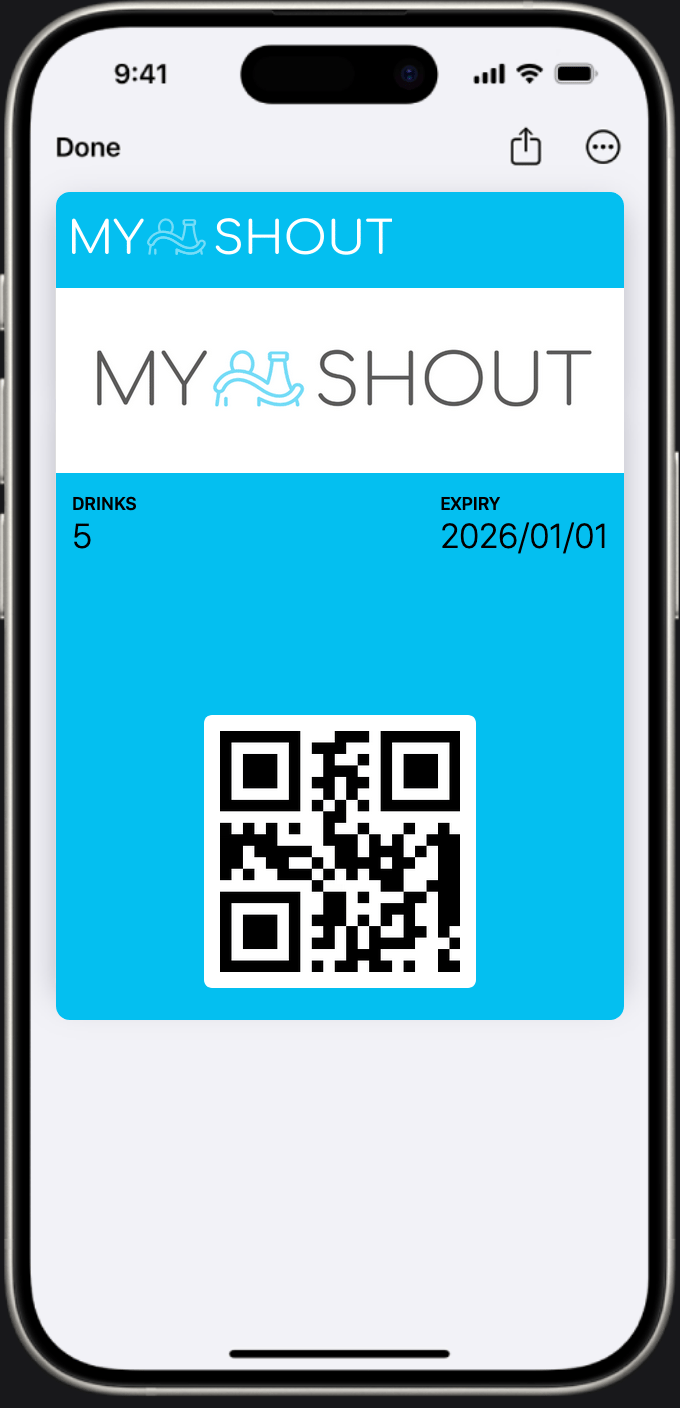
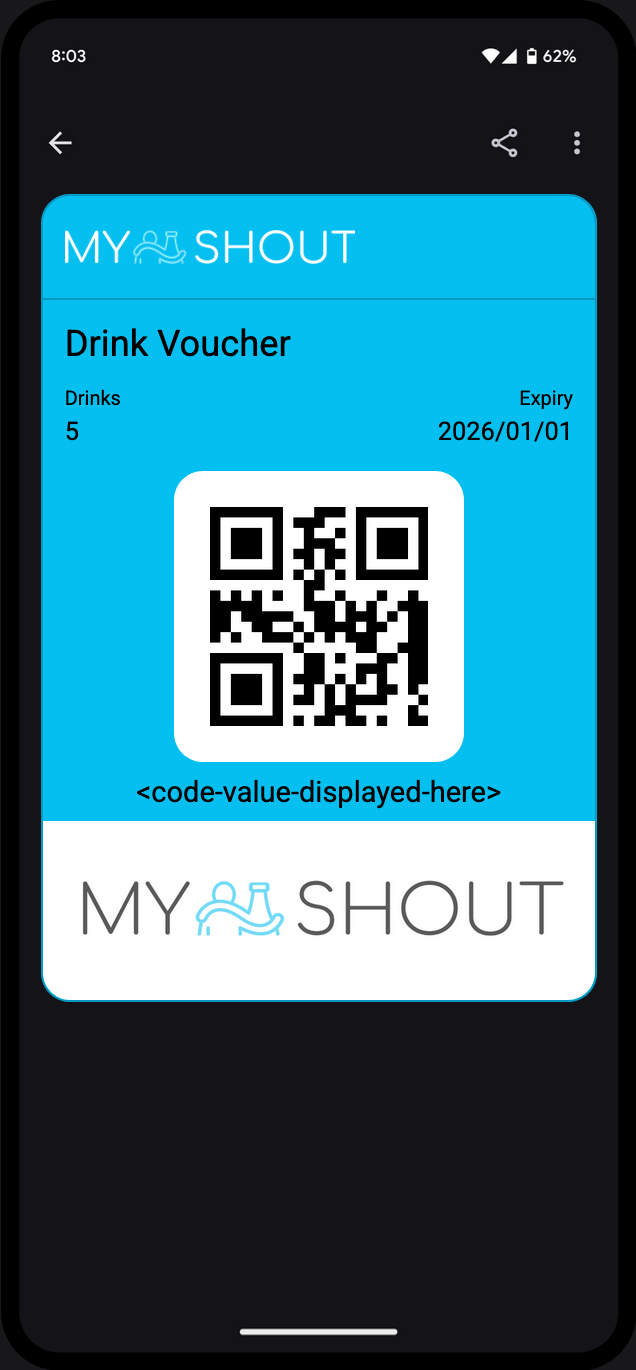
The offer type is designed for vouchers, coupons, and discount passes. It renders as a **Store Card** in Apple Wallet and an **Offer** in Google Wallet.
 **When to use:**
* Discount vouchers (e.g. "20% off your next purchase")
* Single or multi-use digital coupons
* Gift cards and prepaid passes
* Promotional giveaways
**Features:**
* Supports an optional **expiry date** - when set, Apple Wallet displays a countdown and Google Wallet shows the expiry prominently
* Up to 4 front fields for custom content (e.g. discount amount, promo code, eligible items)
* Back fields for terms and conditions, website links, or any supporting text
* Barcode/QR code for scanning at point of sale
```json theme={null}
{
"type": "offer",
"title": "Summer Sale Voucher",
"issuerName": "Acme Co",
"foregroundColor": "#FFFFFF",
"backgroundColor": "#1a1a2e",
"icon": "https://cdn.example.com/icon.png",
"logo": "https://cdn.example.com/logo.png",
"banner": "https://cdn.example.com/banner.png",
"fields": [
{ "key": "discount", "label": "Discount", "value": "20% off" }
]
}
```
***
## Event
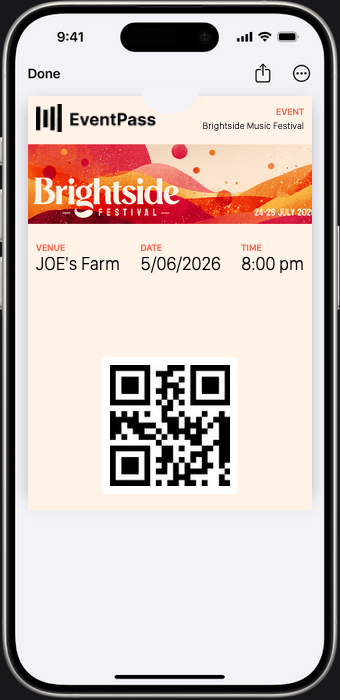
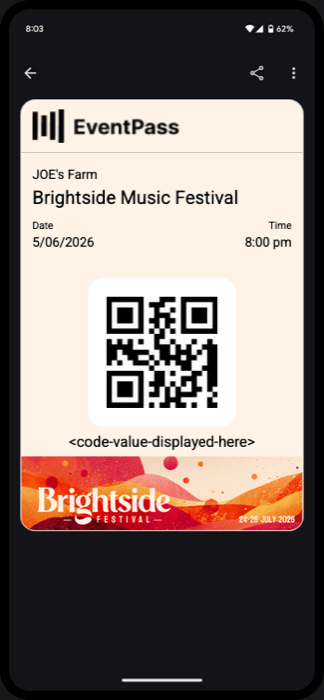
The event type is built for ticketed events. It renders as an **Event Ticket** on both Apple Wallet and Google Wallet, and automatically populates date, time, and venue fields from the template.
**When to use:**
* Discount vouchers (e.g. "20% off your next purchase")
* Single or multi-use digital coupons
* Gift cards and prepaid passes
* Promotional giveaways
**Features:**
* Supports an optional **expiry date** - when set, Apple Wallet displays a countdown and Google Wallet shows the expiry prominently
* Up to 4 front fields for custom content (e.g. discount amount, promo code, eligible items)
* Back fields for terms and conditions, website links, or any supporting text
* Barcode/QR code for scanning at point of sale
```json theme={null}
{
"type": "offer",
"title": "Summer Sale Voucher",
"issuerName": "Acme Co",
"foregroundColor": "#FFFFFF",
"backgroundColor": "#1a1a2e",
"icon": "https://cdn.example.com/icon.png",
"logo": "https://cdn.example.com/logo.png",
"banner": "https://cdn.example.com/banner.png",
"fields": [
{ "key": "discount", "label": "Discount", "value": "20% off" }
]
}
```
***
## Event
The event type is built for ticketed events. It renders as an **Event Ticket** on both Apple Wallet and Google Wallet, and automatically populates date, time, and venue fields from the template.
 **When to use:**
* Concerts, sports fixtures, and theatre shows
* Conferences and workshops
* Any one-time or recurring event with a fixed start time
**Features:**
* **`startDate`** (required) - automatically displayed as separate date and time fields on the pass face; no manual field needed
* **`location`** (optional) - provide an address with latitude/longitude to enable:
* Lock screen notification when the user arrives near the venue (Apple Wallet)
* Venue name and address shown on the back of the pass
* **`relevantDates`** - Apple Wallet surfaces the pass on the lock screen around the event start time
* Header field automatically set to the event title
* Supports up to 4 additional front fields for seat, row, section, gate, or other event-specific details
```json theme={null}
{
"type": "event",
"title": "Opening Night",
"issuerName": "City Theatre",
"startDate": "2026-08-15T19:30:00Z",
"location": {
"name": "City Theatre",
"address": "12 Queen St, Auckland",
"latitude": -36.848461,
"longitude": 174.763336
},
"foregroundColor": "#FFFFFF",
"backgroundColor": "#2d1b69",
"icon": "https://cdn.example.com/icon.png",
"logo": "https://cdn.example.com/logo.png",
"banner": "https://cdn.example.com/banner.png",
"fields": [
{ "key": "seat", "label": "Seat", "value": "D14" }
]
}
```
***
## Membership
The membership type is designed for loyalty cards and ongoing memberships. It renders as a **Store Card** in Apple Wallet and a **Generic** pass in Google Wallet.
**When to use:**
* Concerts, sports fixtures, and theatre shows
* Conferences and workshops
* Any one-time or recurring event with a fixed start time
**Features:**
* **`startDate`** (required) - automatically displayed as separate date and time fields on the pass face; no manual field needed
* **`location`** (optional) - provide an address with latitude/longitude to enable:
* Lock screen notification when the user arrives near the venue (Apple Wallet)
* Venue name and address shown on the back of the pass
* **`relevantDates`** - Apple Wallet surfaces the pass on the lock screen around the event start time
* Header field automatically set to the event title
* Supports up to 4 additional front fields for seat, row, section, gate, or other event-specific details
```json theme={null}
{
"type": "event",
"title": "Opening Night",
"issuerName": "City Theatre",
"startDate": "2026-08-15T19:30:00Z",
"location": {
"name": "City Theatre",
"address": "12 Queen St, Auckland",
"latitude": -36.848461,
"longitude": 174.763336
},
"foregroundColor": "#FFFFFF",
"backgroundColor": "#2d1b69",
"icon": "https://cdn.example.com/icon.png",
"logo": "https://cdn.example.com/logo.png",
"banner": "https://cdn.example.com/banner.png",
"fields": [
{ "key": "seat", "label": "Seat", "value": "D14" }
]
}
```
***
## Membership
The membership type is designed for loyalty cards and ongoing memberships. It renders as a **Store Card** in Apple Wallet and a **Generic** pass in Google Wallet.
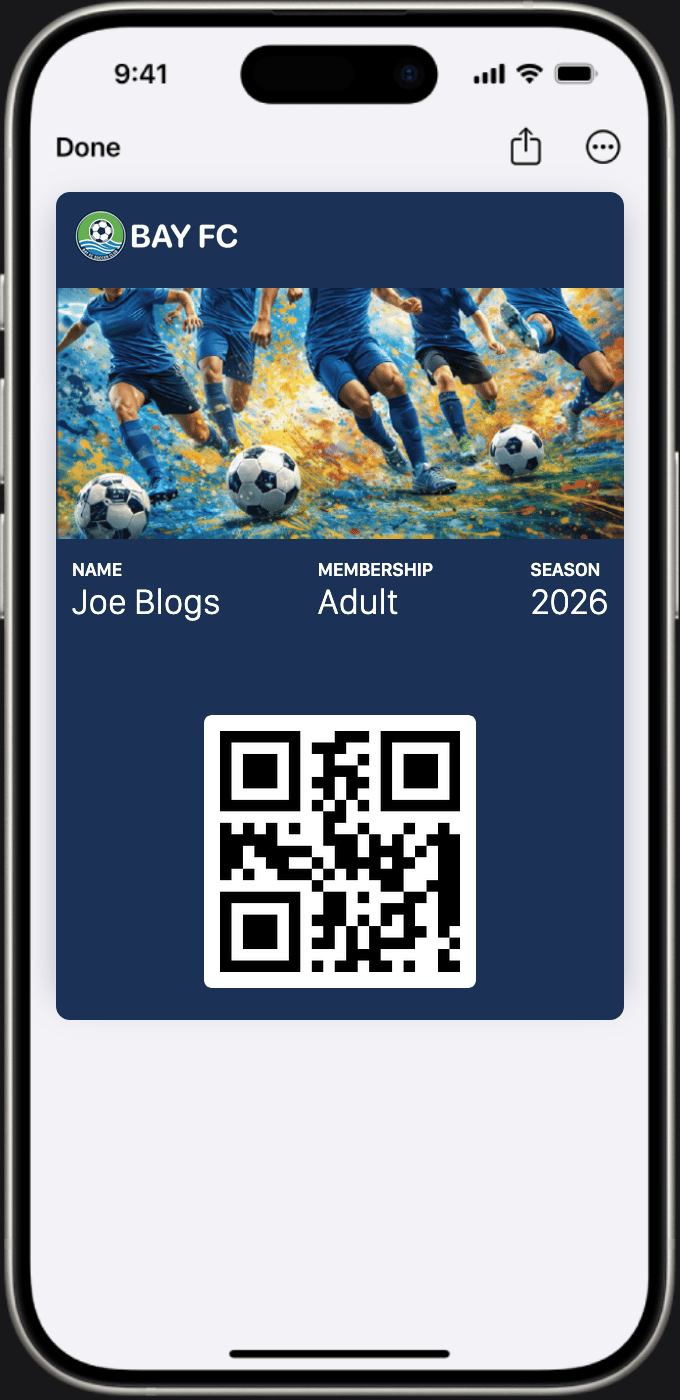
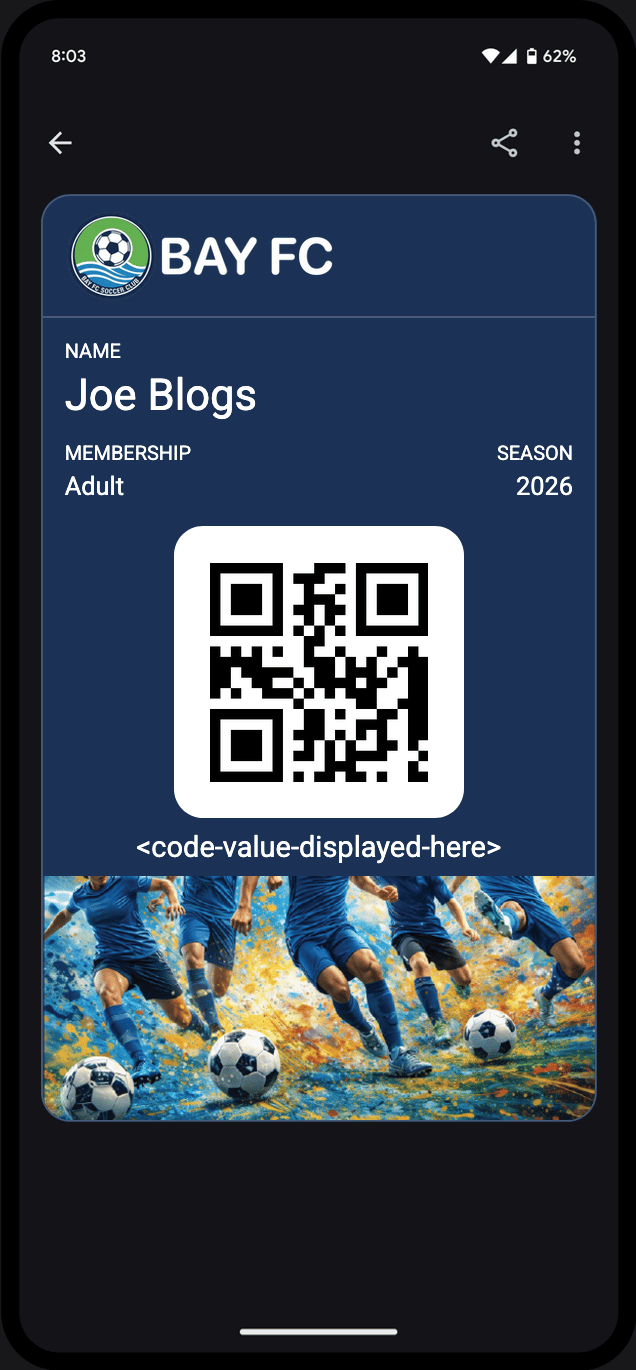 **When to use:**
* Club and organisation memberships
* Loyalty and points cards
* Staff or access passes that need a primary identifier
**Features:**
* **`primaryLabel`** - defines the label displayed next to the member's primary value (e.g. "Member", "Points", "Member ID")
* **`primaryValue`** on each issued pass - the individual value shown for that member (e.g. their name, member number, or points balance)
* Passes can be **updated in real time** - push a new `primaryValue` when a member's points balance changes, without reissuing
* Up to 4 additional front fields for tier, expiry, or other membership details
* Back fields suitable for membership terms, contact info, or redemption instructions
```json theme={null}
{
"type": "membership",
"title": "Gold Member",
"issuerName": "Acme Loyalty",
"primaryLabel": "Points",
"foregroundColor": "#FFFFFF",
"backgroundColor": "#b8860b",
"icon": "https://cdn.example.com/icon.png",
"logo": "https://cdn.example.com/logo.png",
"banner": "https://cdn.example.com/banner.png"
}
```
When issuing a pass, set `primaryValue` to the member's current value:
```json theme={null}
{
"primaryValue": "1,240",
"fields": [
{ "key": "tier", "label": "Tier", "value": "Gold" }
]
}
```
***
## Generic
The generic type is a flexible pass that doesn't carry any built-in field assumptions. It renders as a **Generic** pass on both Apple Wallet and Google Wallet.
**When to use:**
* Club and organisation memberships
* Loyalty and points cards
* Staff or access passes that need a primary identifier
**Features:**
* **`primaryLabel`** - defines the label displayed next to the member's primary value (e.g. "Member", "Points", "Member ID")
* **`primaryValue`** on each issued pass - the individual value shown for that member (e.g. their name, member number, or points balance)
* Passes can be **updated in real time** - push a new `primaryValue` when a member's points balance changes, without reissuing
* Up to 4 additional front fields for tier, expiry, or other membership details
* Back fields suitable for membership terms, contact info, or redemption instructions
```json theme={null}
{
"type": "membership",
"title": "Gold Member",
"issuerName": "Acme Loyalty",
"primaryLabel": "Points",
"foregroundColor": "#FFFFFF",
"backgroundColor": "#b8860b",
"icon": "https://cdn.example.com/icon.png",
"logo": "https://cdn.example.com/logo.png",
"banner": "https://cdn.example.com/banner.png"
}
```
When issuing a pass, set `primaryValue` to the member's current value:
```json theme={null}
{
"primaryValue": "1,240",
"fields": [
{ "key": "tier", "label": "Tier", "value": "Gold" }
]
}
```
***
## Generic
The generic type is a flexible pass that doesn't carry any built-in field assumptions. It renders as a **Generic** pass on both Apple Wallet and Google Wallet.
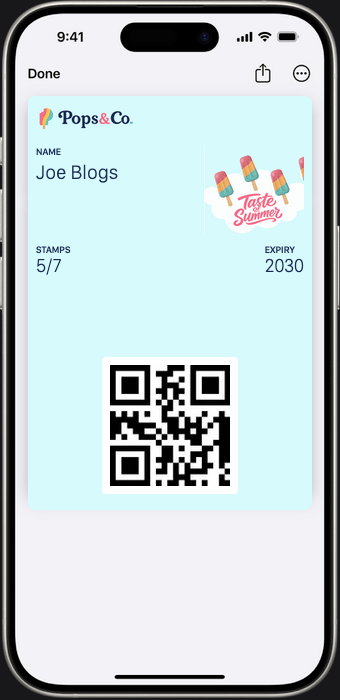
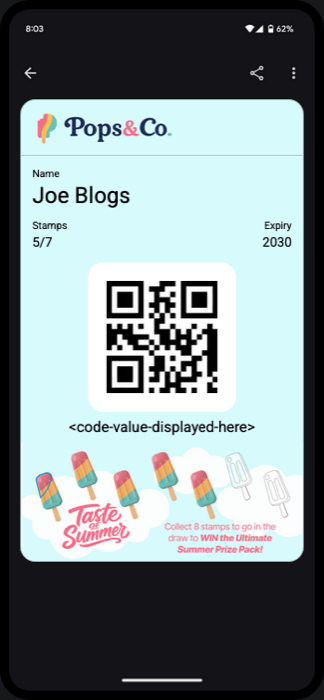 **When to use:**
* ID or credential passes
* Internal access, accreditation, or verification passes
* Any pass that doesn't map cleanly to an offer, event, or membership
**Features:**
* **`primaryLabel`** - label for the primary value displayed prominently on the pass face
* **`thumbnail`** *(Apple Wallet only)* - a square image (90 × 90 px at 1×) shown alongside the primary field instead of the banner image; useful for a profile photo or product image
* Up to 4 front fields for any custom content
* Back fields for supplementary information
```json theme={null}
{
"type": "generic",
"title": "Staff Access Pass",
"issuerName": "Acme Corp",
"primaryLabel": "Employee",
"thumbnail": "https://cdn.example.com/profile.png",
"foregroundColor": "#000000",
"backgroundColor": "#f5f5f5",
"icon": "https://cdn.example.com/icon.png",
"logo": "https://cdn.example.com/logo.png",
"banner": "https://cdn.example.com/banner.png",
"fields": [
{ "key": "dept", "label": "Department", "value": "Engineering" }
]
}
```
***
## Common fields
All pass types share the following base fields:
| Field | Required | Description |
| ------------------- | -------- | -------------------------------------------------------------- |
| `title` | Yes | Displayed on the pass |
| `issuerName` | Yes | Organisation name shown in the wallet app |
| `icon` | Yes | Square app icon image (URL) |
| `logo` | Yes | Horizontal logo with text (URL) |
| `banner` | Yes | Header image shown on the pass (Google and Apple) |
| `foregroundColor` | Yes | Hex or RGB - used for text color (Apple and web viewer) |
| `backgroundColor` | Yes | Hex or RGB - pass background color |
| `labelColor` | No | Apple only - label text color; falls back to `foregroundColor` |
| `background` | No | Web viewer only - background image behind the pass |
| `fields` | No | Up to 4 fields shown on the pass face |
| `backFields` | No | Fields shown on the back of the pass (tap to flip) |
| `sharingProhibited` | No | Disable sharing from mobile wallet apps |
When you issue a pass, the response includes `appleUrl`, `googleUrl`, and `webUrl` so you can distribute the same pass to Apple Wallet, Google Wallet, or Passform's browser-based web viewer.
See the [image dimensions guide](/guides/image-dimensions) for recommended sizes for `icon`, `logo`, `banner`, and `thumbnail`.
**When to use:**
* ID or credential passes
* Internal access, accreditation, or verification passes
* Any pass that doesn't map cleanly to an offer, event, or membership
**Features:**
* **`primaryLabel`** - label for the primary value displayed prominently on the pass face
* **`thumbnail`** *(Apple Wallet only)* - a square image (90 × 90 px at 1×) shown alongside the primary field instead of the banner image; useful for a profile photo or product image
* Up to 4 front fields for any custom content
* Back fields for supplementary information
```json theme={null}
{
"type": "generic",
"title": "Staff Access Pass",
"issuerName": "Acme Corp",
"primaryLabel": "Employee",
"thumbnail": "https://cdn.example.com/profile.png",
"foregroundColor": "#000000",
"backgroundColor": "#f5f5f5",
"icon": "https://cdn.example.com/icon.png",
"logo": "https://cdn.example.com/logo.png",
"banner": "https://cdn.example.com/banner.png",
"fields": [
{ "key": "dept", "label": "Department", "value": "Engineering" }
]
}
```
***
## Common fields
All pass types share the following base fields:
| Field | Required | Description |
| ------------------- | -------- | -------------------------------------------------------------- |
| `title` | Yes | Displayed on the pass |
| `issuerName` | Yes | Organisation name shown in the wallet app |
| `icon` | Yes | Square app icon image (URL) |
| `logo` | Yes | Horizontal logo with text (URL) |
| `banner` | Yes | Header image shown on the pass (Google and Apple) |
| `foregroundColor` | Yes | Hex or RGB - used for text color (Apple and web viewer) |
| `backgroundColor` | Yes | Hex or RGB - pass background color |
| `labelColor` | No | Apple only - label text color; falls back to `foregroundColor` |
| `background` | No | Web viewer only - background image behind the pass |
| `fields` | No | Up to 4 fields shown on the pass face |
| `backFields` | No | Fields shown on the back of the pass (tap to flip) |
| `sharingProhibited` | No | Disable sharing from mobile wallet apps |
When you issue a pass, the response includes `appleUrl`, `googleUrl`, and `webUrl` so you can distribute the same pass to Apple Wallet, Google Wallet, or Passform's browser-based web viewer.
See the [image dimensions guide](/guides/image-dimensions) for recommended sizes for `icon`, `logo`, `banner`, and `thumbnail`.